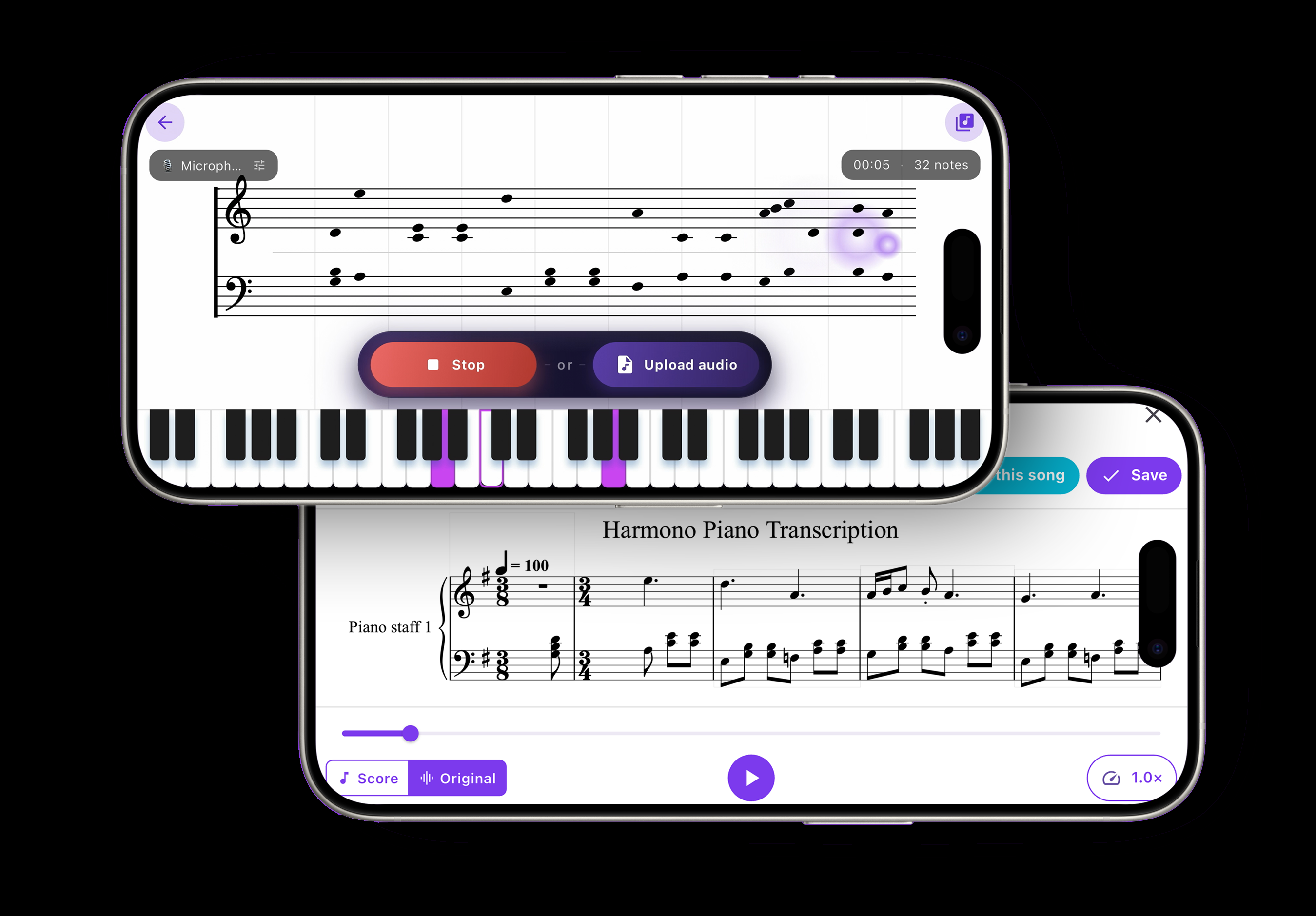
You hear a melody (in a song, in your head, or under your own fingers) and you want it on paper so you can play it, share it, or study it. That's exactly what audio-to-sheet-music conversion does: it listens to sound and turns it into readable notation. In 2026 this is no longer a niche studio trick. The right tool can transcribe audio into notes and rhythm in seconds, and some do it live as they listen. This guide walks through how it works, what transcribes well, and the exact steps to go from audio to a clean, exportable score.
What "audio to sheet music" actually means
Automatic music transcription is the process of converting an audio signal into a symbolic representation (notes, rhythms, and often chords) that a musician can read. Under the hood, a transcription engine is solving two problems at once:
- Pitch detection. Analyzing the frequencies in the audio to decide which notes are sounding and when. A clean A4, for example, centers around 440 Hz; the engine maps those frequencies back to named notes on the staff.
- Rhythm and timing detection. Finding the underlying beat, then quantizing when each note starts and how long it lasts, so a played phrase becomes proper quarter notes, eighths, and rests instead of raw milliseconds.
Modern engines use machine-learning models trained on huge amounts of music, which is why today's results are dramatically cleaner than the tools of even a few years ago. Still, no transcription is magic; the quality of what comes out depends heavily on what goes in.
What kinds of audio transcribe best
The single biggest factor is how many notes are sounding at once. Clear, mostly single-line audio transcribes beautifully; dense, layered mixes are much harder.
| Audio type | How well it transcribes |
|---|---|
| Solo melody (voice, single instrument, or one hand of piano) | Excellent: this is the sweet spot |
| Solo piano or guitar with clear chords | Very good, with a little cleanup |
| Small ensemble or a clean backing track | Good for the lead line; inner parts get fuzzy |
| Full band mix with drums, vocals, and effects | Challenging: expect to isolate a part first |
Rule of thumb: the closer your audio is to one clear voice at a time, the closer your notation will be to perfect. When in doubt, transcribe the melody first, then add harmony by hand.
How to convert audio to sheet music, step by step
- Choose a transcription tool. Look for one that detects both pitch and rhythm, lets you edit the result, and exports to a format you can use. Harmono is built for exactly this: it transcribes audio into standard notation live as it listens, so you watch the notes appear in real time rather than uploading and waiting.
- Record or upload your audio. You can play or sing directly into the app, capture audio live in the room, or upload an existing recording or file. If you're playing an acoustic instrument, get close to the mic and reduce background noise; if you're using a digital piano, a direct connection gives the cleanest signal.
- Let the tool detect notes and rhythm. As it listens, the engine identifies each pitch and locks the timing to a beat. With a live-transcription tool you'll see the staff fill in as you go, which makes it obvious in the moment whether it's hearing you correctly.
- Review and clean up the notation. This is where good tools earn their keep. Check for the usual suspects: a stray note from background noise, an octave that jumped, or a rhythm that quantized oddly on a rubato phrase. Fix wrong pitches, tidy the time signature and key, and remove anything the engine misheard. A few minutes here turns a rough draft into a score you'd actually hand to another player.
- Export to PDF or MIDI. Export a PDF when you want printable, readable sheet music, and MIDI when you want to keep editing in a notation program or DAW. MIDI carries the raw note data, so it's the format to choose if the piece is headed for further arranging.
- Or turn it into a play-along tutorial. If your goal is to learn the piece rather than just print it, convert the transcription into a falling-tiles tutorial and play along at your own pace. Harmono can take the notation it just captured and turn it into a falling-tiles play-along, which closes the loop from "I heard this" to "I can play this."
Tips for a clean recording
Transcription quality starts at the microphone. A little care up front saves a lot of editing later:
- Play one clear part at a time. If you can, record the melody on its own, then the accompaniment. Separate passes transcribe far more accurately than everything at once.
- Quiet the room. Fans, traffic, and chatter all add stray frequencies the engine may read as phantom notes.
- Keep a steady tempo. Playing to a metronome or click makes rhythm detection dramatically cleaner, because the beat grid the engine relies on is easier to find.
- Mind your levels. Aim for a strong but not clipping signal; distortion smears the pitches and confuses the analysis.
What you can do with the result
Once your audio is notation, it becomes flexible in a way sound never is. You can print it and read it, transpose it into a friendlier key, slow it down to learn it, or share the file with a bandmate or teacher. If you captured your own improvisation, you now have a permanent record of an idea that would otherwise have vanished. And if reading is still new to you, pairing the score with our guide on how to read sheet music for beginners turns each transcription into a reading lesson.
For learners, the most powerful next step is play-along practice. The same audio you transcribed can become an interactive lesson; see our walkthrough on how to turn any song into a piano tutorial, and if you're weighing which app to build this habit in, our roundup of the best piano app in 2026 compares the options. Consistent, feedback-driven work like this is exactly what our guide on practicing piano effectively is built around.
The bottom line
Converting audio to sheet music has gone from a specialist's chore to something you can do in a single sitting: pick a tool that hears both pitch and rhythm, feed it clean audio, review the notation, and export a PDF or MIDI, or turn it straight into a tutorial. Feed it a clear melody and you'll be amazed how close the first draft is. With a live-transcription app like Harmono, the gap between hearing music and holding the score for it is now measured in seconds.