There's a particular kind of frustration every self-taught pianist knows: a song is stuck in your head, you'd love to play it, and there's simply no good tutorial for it. Maybe it's an obscure track, a film cue, or a friend's original. Or maybe there is a tutorial, but it's a wall of dense sheet music, an arrangement in the wrong key, or a video that's either wildly too hard or subtly wrong. This guide walks through how to turn any song into a piano tutorial you can actually learn from, going from audio you love straight to an interactive, play-along lesson at your own pace.
The problem with "just find a tutorial"
The conventional advice, search for a tutorial and follow along, breaks down constantly. Popular songs have dozens of arrangements of wildly varying quality. Everything else has none at all. And even when a video exists, learning from someone else's hands moving on a screen is slow: you're reverse-engineering their fingers frame by frame instead of seeing the notes themselves. What most beginners actually want is simpler than sheet music and more reliable than a video: a clear map of which notes to press and when, drawn from the real recording.
What a "falling-tiles" tutorial is (and why it works)
A falling-tiles tutorial shows notes as colored bars descending toward a piano keyboard on screen. Each bar lines up with a key; the moment it reaches the keyboard is the moment you play. A bar's length tells you how long to hold the note, and its horizontal position tells you exactly where on the keyboard your finger goes. That's the whole language: no clefs, no key signatures, no rhythmic notation to decode first.
Falling tiles work because they collapse the two hardest questions for a beginner (what note? and when?) into a single picture you read intuitively, the same way you'd catch a ball you can see coming.
This makes them an ideal on-ramp. You can start playing a real song in minutes, and because you're matching the actual recording, you build a feel for rhythm and phrasing from day one. Sheet music is still worth learning, see how to read sheet music for beginners, but it doesn't have to be the barrier between you and the song you want to play today.
How to turn any song into a tutorial, step by step
- Get the song as audio. Record it live, whether humming, playing it, or capturing it from a speaker, or upload an existing audio file. This is your source of truth: the real melody and harmony, not someone else's interpretation of it.
- Transcribe the audio into notation. The audio needs to become notes. Modern tools can listen to a recording and detect pitches and timing automatically, producing sheet music without you writing a single note by hand. This is the heavy lifting; for a deeper look at how it works, see how to convert audio to sheet music.
- Convert the notation into a play-along tutorial. Turn those notes into falling tiles mapped to an on-screen keyboard. Now the transcription isn't a static page: it's an interactive lesson that shows you what to press and when.
- Slow it down and learn in sections. Drop the tempo, pick a short passage (often just four to eight bars) and loop it until it's comfortable before moving on. Small wins stacked together beat trying to play the whole thing top to bottom.
- Play along and get feedback. Practice against the tutorial at your chosen speed while something listens back and flags where your timing or accuracy slipped. Correcting mistakes early, before they become habits, is the fastest route to actually owning the song.
Tips for learning a song efficiently
Turning a song into a tutorial is half the battle; practicing it well is the other half. A few habits make an enormous difference:
- Hands separately first. Learn the right hand until it's automatic, then the left, then combine. Trying both at once from the start is where most people stall.
- Loop the hard sections. Don't rehearse the parts you already play well. Isolate the two bars that trip you up and repeat only those.
- Start slower than feels necessary. Accuracy at a slow tempo builds correct muscle memory; speed follows naturally once the movements are clean.
- Play the whole song occasionally. Once sections are solid, run it start to finish to stitch them together and build stamina.
If you want to go further on the underlying method, our guide to how to practice piano effectively breaks down why looping and slow practice work so well.
Where Harmono fits in
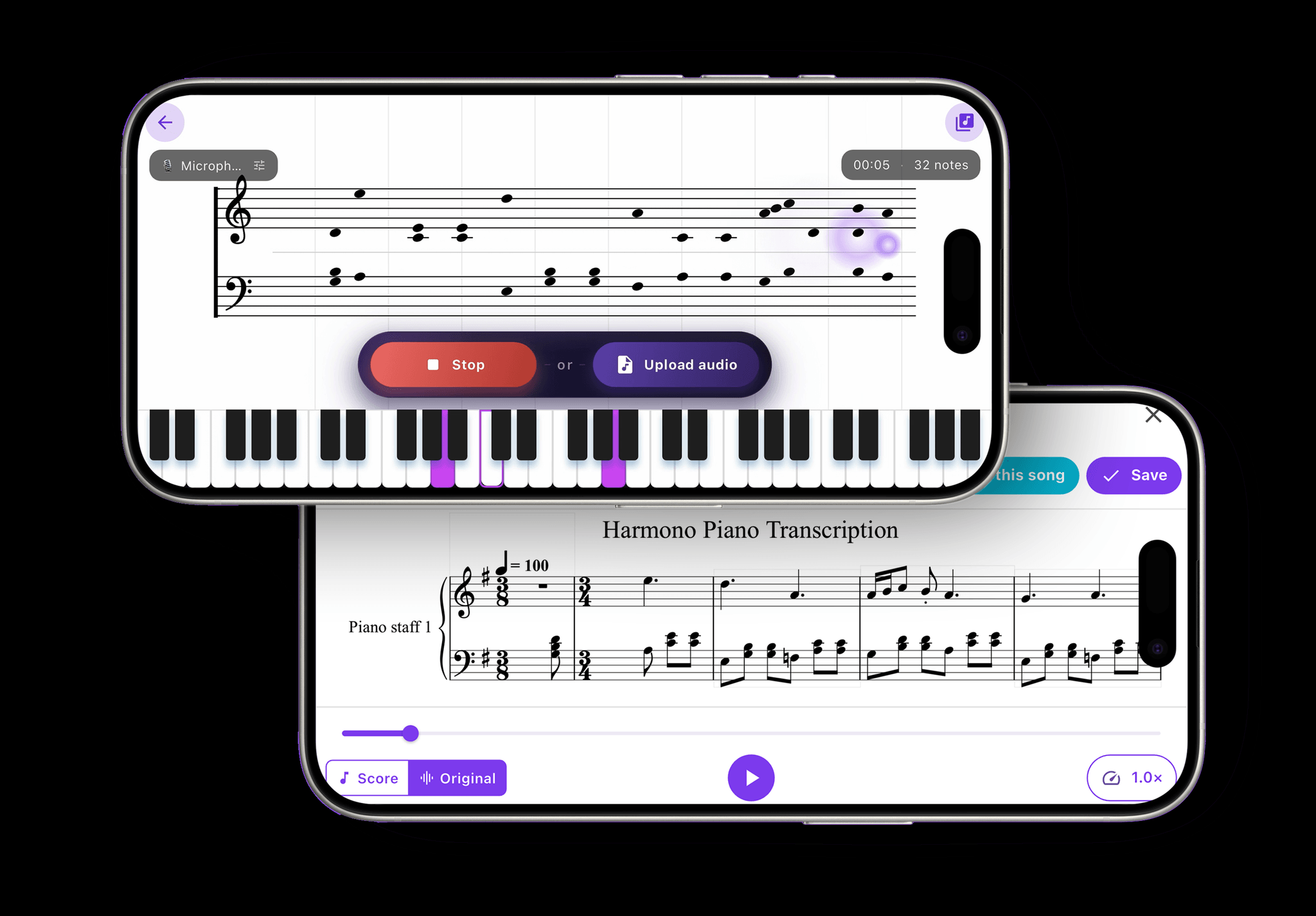
This whole workflow is exactly what Harmono was built to do. You record or upload a song and watch it transcribe to sheet music live, then turn that transcription into an interactive falling-tiles tutorial you learn at your own pace. As you play along, Harmono listens and gives you feedback on your timing and accuracy, so you always know which bars need another pass. In practice it means the song stuck in your head this morning can become a lesson you're practicing this afternoon, with no hunting for the "right" tutorial, and no arrangement in the wrong key.
A quick word on legality and personal use
Learning to play songs you love, for yourself, is squarely personal use, the equivalent of figuring out a tune by ear at home, just faster and more accurate. That's a normal, everyday part of learning an instrument. The considerations only change if you plan to publish or distribute a transcription or arrangement commercially, which involves the songwriter's rights. For simply learning the music that moves you, you're doing what pianists have always done.
The bottom line
| The old way | The tutorial-from-audio way |
|---|---|
| Hope a tutorial exists for your song | Turn any recording into one yourself |
| Trust someone else's arrangement and key | Work from the real recording you love |
| Decode dense sheet music before playing a note | Read intuitive falling tiles from minute one |
| Practice blind and ingrain mistakes | Get live feedback on timing and accuracy |
You no longer have to wait for the internet to hand you a tutorial for the song in your head. With the right tools you can make one from the music itself: transcribe it, turn it into a play-along, slow it down, and learn it section by section with feedback guiding you. If you're weighing which app to build this habit around, our roundup of the best piano app for 2026 is a good place to start. The song you love most is probably the one that will keep you at the keys, so make the tutorial for that one, and start today.